25 Jun 2026
SOURCE: CPF Board

Finding CPF information online is easy. Knowing whether it is accurate is a different matter.
AI tools are increasingly popular for looking up CPF-related topics. However, they tend to pull from a wide range of sources and not all of them are current or correct.
Examining sources cited by various public AI search engines (LLMs) also shows significant differences in how CPF sources are cited. This means that regardless of which AI search engine tool you use, it is still important to verify whether the sources provided are accurate.
Before acting on any CPF information you find online, always fact-check and verify it through official CPF channels.
The good news is there is a straightforward way on Google to do exactly that. By adding CPF Board as a preferred source, Google prioritises official information by the CPF Board in your search results so that the right information finds you first.
What are preferred sources?

Preferred sources is a Google feature that lets you choose which websites appear at the top of your search results. By adding a preferred source, you gain more control on your content preferences on Google.
Where will my preferred sources appear?
When you add CPF as a preferred source, official CPF content is more likely to appear when you search for CPF-related topics.
Updates by the CPF Board will appear under "Top Stories" during relevant searches, putting verified information where you can find it easily.
What are the benefits of adding CPF Board as a preferred source?
Adding CPF Board as a preferred source helps ensure that you get the right CPF-related information.
When you are making decisions about your CPF savings, retirement planning, housing withdrawals, or healthcare contributions, you need information that is current and correct.
Relying on a third-party article, social media post, or an AI summary introduces the risk of acting on something that may not be completely accurate.
How do I add CPF Board as a Google preferred source?
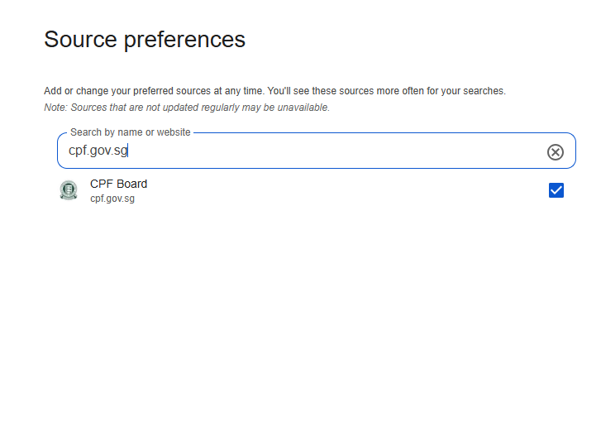
Adding CPF Board as a preferred source takes under a minute. Simply visit the preferred source page and tick the box next to cpf.gov.sg.
If you are not signed in or you do not have a Google account, the link will direct you to sign in or create an account before bringing you to the preferred source page.
Information in this article is accurate as at the date of publication.


